2009-10-10

Panoye framework

A few month ago I decided to go open source. Not all of the code from Panoye, only one part - the framework. So, if you want to take a look on this code, search for bugs, you can download it here: http://code.google.com/p/panoye-f/.

The framework consists of PHP scripts and classes which are not specific to Panoye and can be used for any PHP5 powered site.

The most important technical details od panoye-f framework are:
  • Small and lightweight,
  • It has its own ORM (Object Relation Mapping) classes,
  • Code creation (ORM and CRUD) from database tables,
  • Filesystem (gzipped) caching for pages,
  • Automatic class loading (no need to import, require or require_once),
  • Unit testing,
  • Lots of utility classes (Strings, RSSBuilder, SitemapBuilder, HtmlLexer, ...),
  • Sql, DbIterator and AppObject, Date and Timestamp classes fordatabase programming and ORM,
  • Automatic creation of search engine friendly links for objects in database.
  • Etc.

2009-07-26

Panoye @ FriendFeed

New FriendFeed feed for Panoye. If you are a FF user - feel free to follow us at friendfeed.com/panoye.

2009-06-29

Partial panoramas orientation

This is a response to a question asked by gopanthers - Orientation Failure results in No Panoramas Saved. The problem is the orientation of partial panoramas.

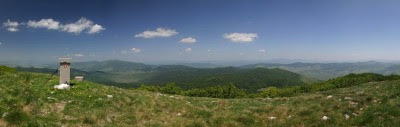
After you selected your panorama type to be partial - the next thing to do is - orientation. First of all, let us suppose the panorama in question is this one:


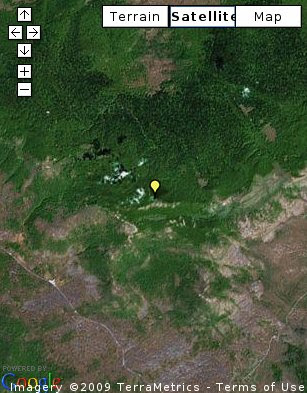
...and let's suppose, the position on the map is:


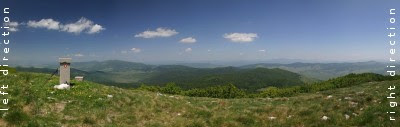
First of all, unlike the "full" cylindrical panorama - partial panoramas cover only part of the field of view around the location. For example, the field of view of our panorama is...


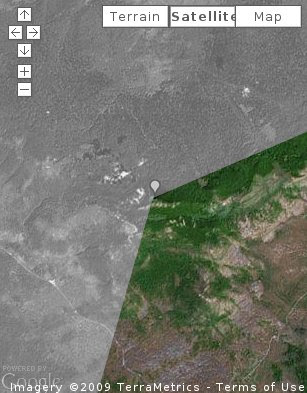
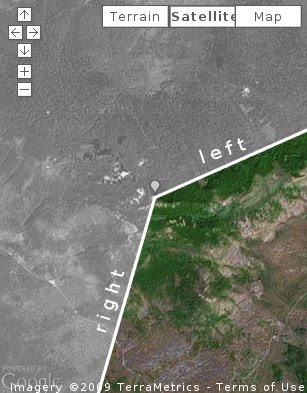
Now, the proccess of orientation consists of finding the directions of the left and right directions on the panorama:


On the map:


So, now you should click twice on the map. First click anywhere on the line marked "left", and second click anywhere on the line "right". The order (first left) is important! After the second click on the map you should be automatically redirected to the finished panorama. Note that the left and right lines are not visible - you must imagine them on the map.

And, of course, if the resulting panorama orientation is not correct - just click "Edit" (on the page with your panorama, below the map) skip the first two steps and try your orientation again.

2009-06-28

Panoye, twitter & twitterboard [testing]

Testing the twitterboard widget. Just to see if it is interesting to panoye users...


PS.Just in case you didn't know, panoye is on Twitter. Feel free to follow ;)